
This week, I made a journey on AI agents for producing software. For keeping costs low, I want to run everything on a local computer, which is a MacBook Pro with Apple M5 and 24GB memory.
As setup some software assets are required for getting everything up-and-running:
- HomeBrew
A MacOS package manager. - Ollama
A local AI-Server, running the AI model. - AI-Model
The model running on Ollama. It can only reply to requests. - AI-Agents
The agent interacting with the model. It can handle requests and structure them.- OpenCode
General AI Agent for writing code. - AIder
AI-Agent for Git-based refactoring.
- OpenCode
- Open Web-UI
- SCM-Integration (Git)
- VS Code
A development environment for interacting.
Installation
HomeBrew
Let’s start with a package manager for MacOS: HomeBrew; it will support us for installing all needed packages and dependencies:
/bin/bash -c "$(curl -fsSL https://raw.githubusercontent.com/Homebrew/install/HEAD/install.sh)"
Ollama
The name comes from the aztecs game Ōllamaliztli, a ball-game, where two teams need to move a heavy ball through a metal-ring on the side of an area. It runs the “heavy” AI-Model.
brew install ollama
ollama --version
ollama version is 0.32.5
AI-Model
Next comes the needed AI model. There are several models in place, serving different purposes:
- Qwen3 is the latest generation of large language models in Qwen series, offering a comprehensive suite of dense and mixture-of-experts (MoE) models. The -coder variant is specialized in software development.
- Mistral AI is an european open-wight-model based in france having its strength in processing multi-lingual tasks.
- DeepSeek is specialized in logic and coding and includes a web-ui and APIs.
We will use Qwen3 as it offers a 30B MoE model, which fits best to our desired hardware:
MoE stands for Mixture of Experts and indicates, that not the whole (dense) models parameters are used for inferences. Parameters like A3B (Active 3 Billion) indicate about required hardware utilization.
# Pull qwen3-coder with 30 billion parameters
ollama pull qwen3-coder:30b
pulling manifest
pulling 1194192cf2a1:  48% ▕████████████████████████████████████████████████████                                                         ▏ 9.0 GB/ 18 GB  7.2 MB/s  22m17
[...]

# Pull qwen3 with 14 billion parameters
ollama pull qwen3:14b
[...]

# Create custom configuration, having 32.000 token context-window
cat > Modelfile <<'EOF'
FROM qwen3-coder:30b

PARAMETER num_ctx 32768
EOF

# Creates the customized model
ollama create qwen3-coder:30b-32k -f Modelfile
gathering model components
using existing layer sha256:1194192cf2a187eb02722edcc3f77b11d21f537048ce04b67ccf8ba78863006a
using existing layer sha256:d18a5cc71b84bc4af394a31116bd3932b42241de70c77d2b76d69a314ec8aa12
creating new layer sha256:91cb213206c73d1aeec3081637e1c31d0243d7dabe8f3f8a1b1189c2c23baa94
writing manifest
success

# Shows the adjustment in the customized model
ollama show qwen3-coder:30b-32k
  Model
    architecture        qwen3moe
    parameters          30.5B
    context length      262144
    embedding length    2048
    quantization        Q4_K_M

  Capabilities
    completion
    tools

  Parameters
    repeat_penalty    1.05
    stop              "<|im_start|>"
    stop              "<|im_end|>"
    stop              "<|endoftext|>"
    temperature       0.7
    top_k             20
    top_p             0.8
    num_ctx           32768

  License
    Apache License
    Version 2.0, January 2004
    ...

# Starts the model for interaction (optional)
ollama run qwen3-coder:30b-32k
>>> Write "OK".
LLM Evaluations
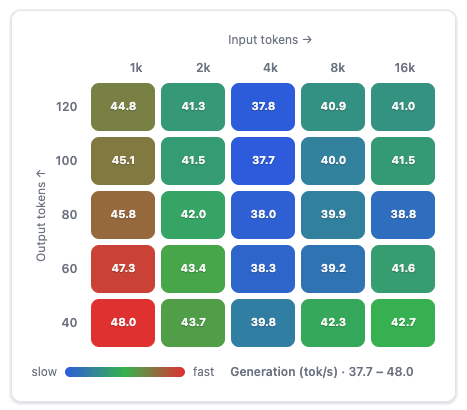
qwen3-coder:30b-a3b-q4_K_M
with 21GB iogpu wirde limit
You can adjust the iogpu configuration via terminal, e.g.:sudo sysctl iogpu.wired_limit_mb=22528
I am regularly evaluating LLMs on a MacBook Pro with M5 and 24GB shared memory. I connecto to it using Open-WebUI for keeping memory for the LLM, only.
I tested several LLMs already and published results, including:
– qwen3-coder:30b-a3b-q4_K_M-16k
iogpu-wired_limit_mb: 22528
– qwen3-coder:30b-a3b-q4_K_M-16k
iogpu-wired_limit_mb: 21504
– qwen3-coder:30b-a3b-q4_K_M (41.7 tok/s, 100% GPU offload)
iogpu-wired_limit_mb: 21504
– qwen3-coder:30b-a3b-q4_K_M (41,1 tok/s, 95% GPU offload)
default iogpu-wired_limit_mb
– qwen3:14b-32k
iogpu-wired_limit_mb: 21504
– qwen3:14b-32k
default iogpu-wired_limit_mb
You can find all results at https://evaluator.docker-service.de/.
Please don’t hesitate contacting me for testing other models.
AI-Agents
Next we need two AI-Agents: One general for:
- OpenCode
AI-Agent for autonomous software development. Strong in. creating new projects and implement them in phases. Works like Claude Code. Example: “Create a FastAPI application with PostgreSQL, Docker, JWT and tests.” - Aider
AI-Agent specialized in code-refactorings, especially in Git. Strong in fixing bugs, adding new features and tightly integrate into Git. Example: “Add tenant capability and adjust all tests.”
Let’s install the agents and configure them to use our AI-Model:
OpenCode
brew install opencode
ollama launch opencode --model qwen3-coder
Aider
brew install pipx
pipx ensurepath
pipx install aider-chat
aider --version
aider --model ollama/qwen3-coder:30b
Open WebUI
Next we need a web uiser interface. Open WebUI looks like ChatGPT and can be deployed via Docker:
brew install --cask docker
docker run -d \
-p 3000:8080 \
--name open-webui \
--restart always \
ghcr.io/open-webui/open-webui:main
Visual Studio Code
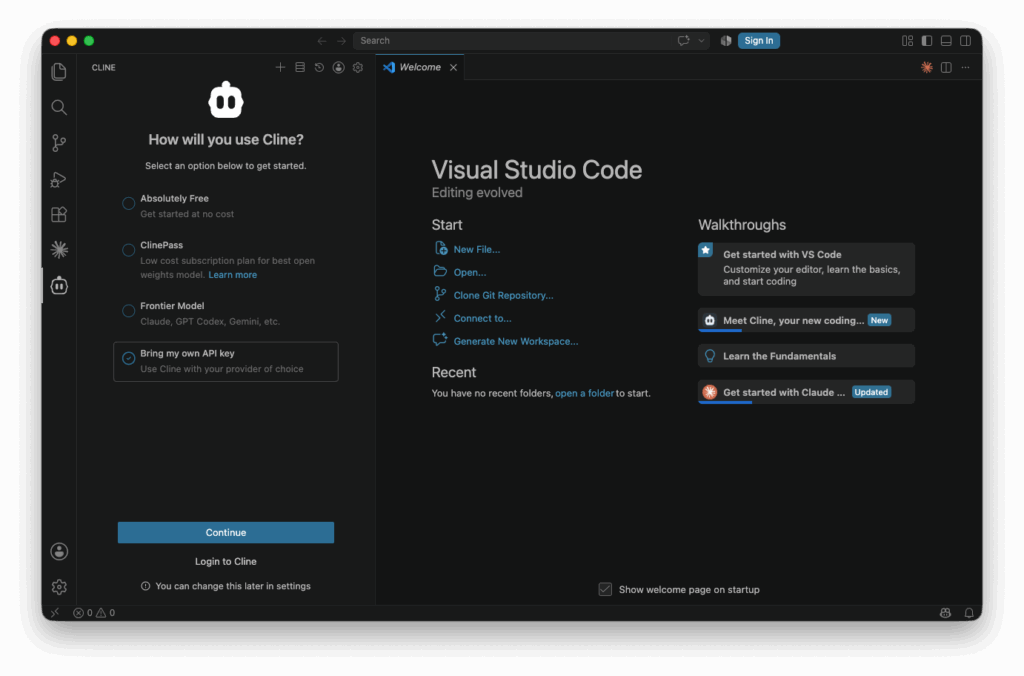
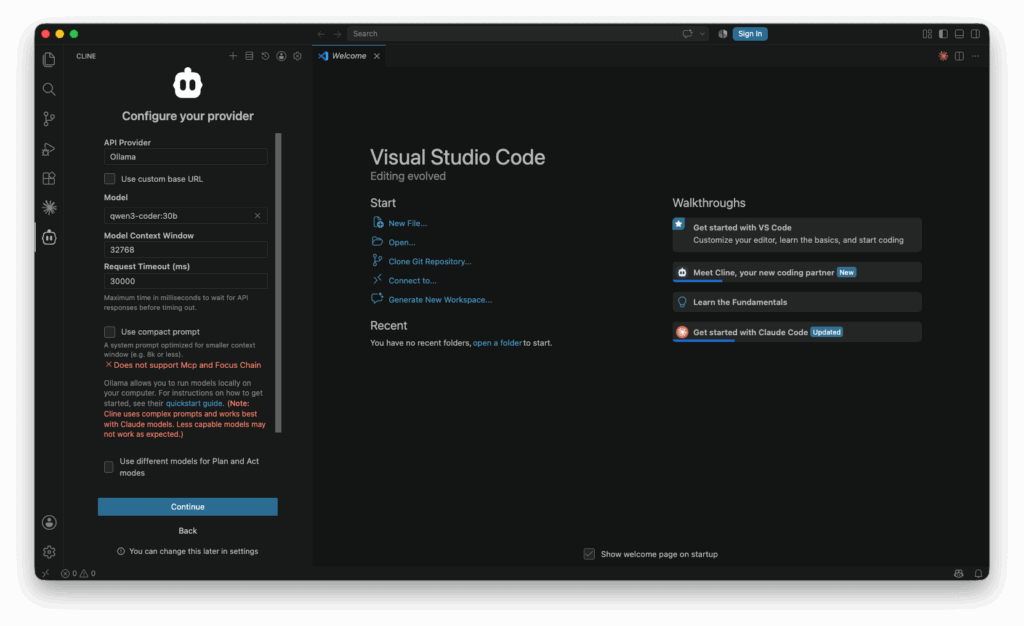
For connecting VS Code with ollama and our agents, we need to install the Cline extension. It is an open-source AI code agent, which needs to be configured afterwards, for using ollama and our AI-Agent: