
If you read my other articles, you will have noticed, that I do run some applications in my kubernetes cluster. While setting features and content operational and available to public, I always disliked setting up the related monitoring systems; an extra-step I was always not motivated for executing. But it is best practice and important for keeping everything aligned and operational.
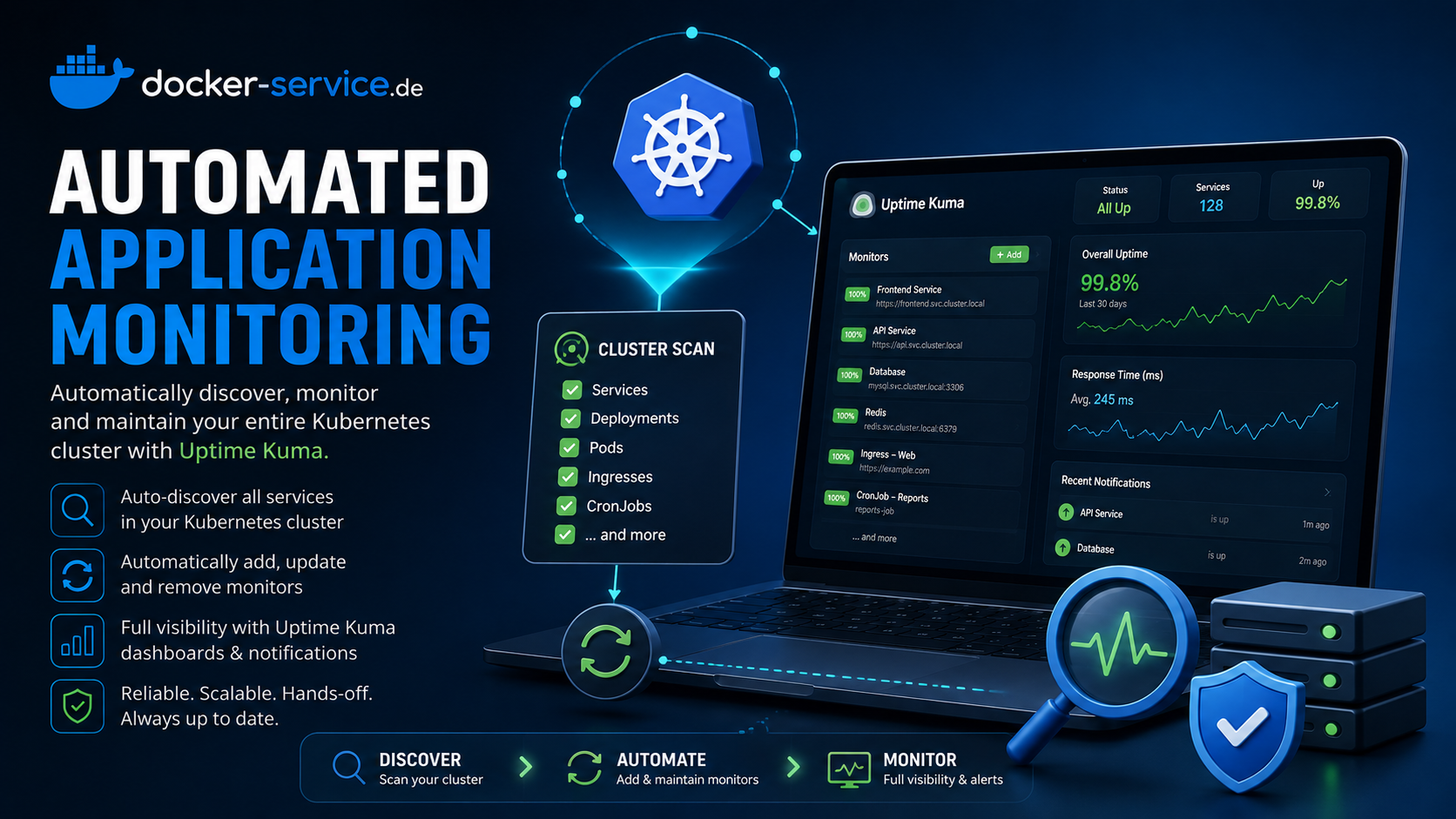
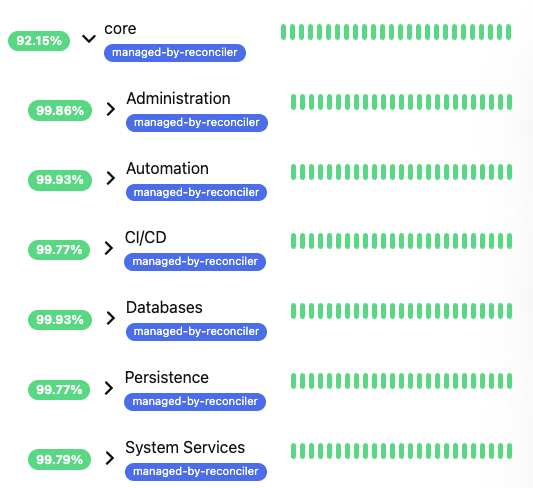
For addressing this building block, I extended moellere/uptime-kuma-reconciler with additional capabilities for ISTIO (Pull Request #12) and introduced an auto-monitoring mode within an own extension. It automatically checks the cluster for Service objects and defines TCP monitoring checks for it. In case of additional Istio VirtualService objects, pointing to a Service, HTTP/HTTPS is used instead of TCP. This way, all important services are automatically considered for monitoring. For proper structuring, I defined a nested-group method:
- Namespace-Prefixes define tenants
Defined prefixes separate applications of multiple tenants, e.g. all namespaces starting with ns1-*, ns2-* are grouped. Namespaces with ns1 as prefix, e.g. ns1-app1, ns1-app2 are grouped in Uptime Kuma within ns1. While ns2-app1, ns2-app2 are grouped in ns2. - Namespaces define Applications
Each namespace is considered as one applicaiton. Each application can have multiple services and therefore checks underneath. Via annotationuptime-kuma.io/monitor: "true"monitoring can be manually added. Otherwise thenamespace-mode considers the whole cluster. - Applications are cateorized
Whilevalues.yamldefine categories. Namespaces, containing defined words invalues.yaml, are auto-categorized.
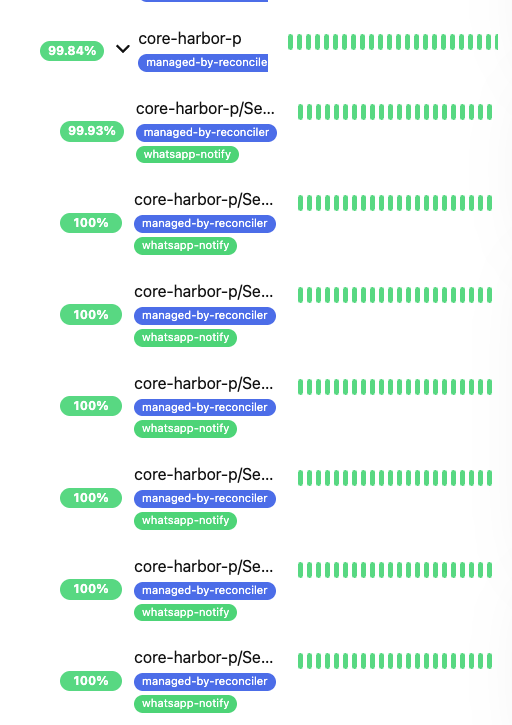
The checks and categorization in Uptime Kuma looks like the following. Managed items are tagged with managed-by-reconciler for spearating manual from managed checks.
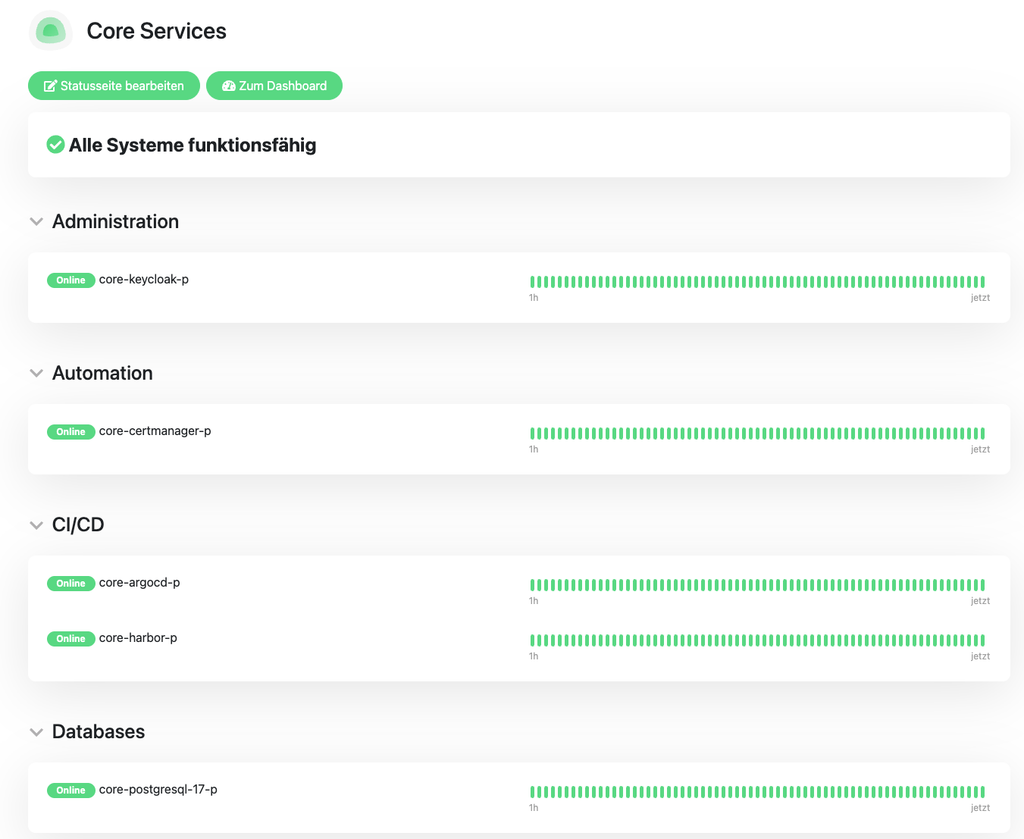
Further, I included an optional status-page creation. In my perspective it makes most sense to structure them tenant-based (see ①). By activating the option in values.yaml, these pages are automatically maintained in case of changes. The show the application status (therefore the overall view of the namespace, see ②), not the individual service status within the namespace. Therefore, expiration of SSL/TLS certificates are not illustrated (on purpose). They look like the following:
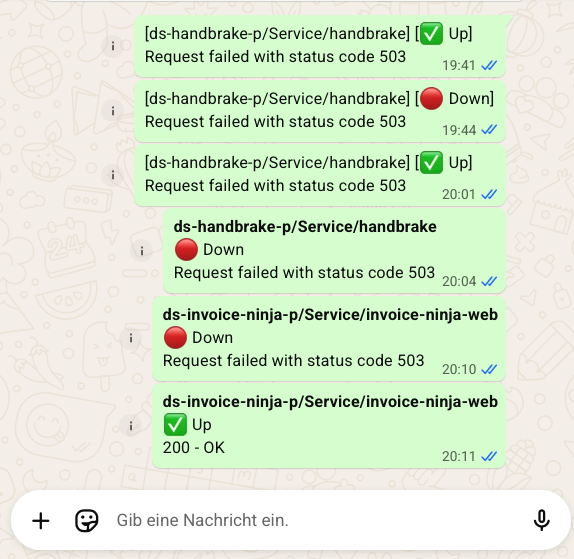
While I really enjoy always up-to-date checks, I also introduced a WhatsApp connector for getting push-notifications via WhatAapp, if enabled in values.yaml and configured via QR-Code auth + API Key. In case of any downtime and recovery I get instant-push messages:
If this sounds promising to you, please don’t hesitate contacting me for bringing your application monitoring to the next level. I belive this is an idea worth spreading. And: I have a lot more for reducing operational costs and focusing on things matter most: the business.
Of cause, the image is regularly scanned for vulnerabilities, updated and maintained.
Feel free pulling it via HELM via:
oci://harbor.docker-service.de/charts/uptime-kuma-reconciler
default values.yaml
# Uptime Kuma connection settings
kumaUrl: "http://uptime-kuma.default.svc.cluster.local:3001"

# Reconciler settings
resyncInterval: "300"    # Seconds between full reconciliation cycles
# Optional cron expression (5-field, standard crontab syntax) for the
# resync schedule instead of a fixed interval - e.g. "*/15 * * * *" for
# every 15 minutes, or "0 * * * *" for the top of every hour. Takes
# precedence over resyncInterval when set; falls back to resyncInterval
# (logging an error) if the expression is invalid.
resyncCron: ""
logLevel: "INFO"         # DEBUG, INFO, WARNING, ERROR

# Number of old ReplicaSets to retain for rollback history
revisionHistoryLimit: 1

# Credentials - provide via existingSecret or inline (not recommended)
credentials:
  # Name of an existing Kubernetes Secret containing 'username' and 'password'
  # keys (plus an optional 'totpSecret' key if 2FA is enabled)
  existingSecret: ""
  # Only used if existingSecret is empty (NOT recommended for production)
  username: ""
  password: ""
  # TOTP secret (base32) if 2FA is enabled on the Uptime Kuma account. The
  # reconciler computes a fresh code from this at every login attempt.
  totpSecret: ""

# Container image
image:
  repository: harbor.docker-service.de/library/uptime-kuma-reconciler
  # Falls back to Chart.yaml's appVersion when empty.
  tag: ""
  # Always, not IfNotPresent: image tags get reused across builds until the
  # version-bump commit lands (see Jenkinsfile), so a node that cached an
  # older image under the same tag would otherwise never re-pull.
  pullPolicy: Always

  # Set to a custom image if you've built the Dockerfile:
  # repository: ghcr.io/moellere/uptime-kuma-reconciler
  # useCustomImage: true

  # When false, uses python:3.11-slim and installs deps at startup (simpler, no build needed)
  # When true, assumes the image already has reconciler.py and deps baked in
  useCustomImage: true

# Resource limits
resources:
  requests:
    cpu: 50m
    memory: 64Mi
  limits:
    cpu: 200m
    memory: 128Mi

# Service account
serviceAccount:
  create: true
  name: ""
  annotations: {}

# Pod settings
podAnnotations: {}
nodeSelector: {}
tolerations: []
affinity: {}

# Static monitors - define monitors for non-Kubernetes hosts
# These are mounted as a ConfigMap at /config/monitors.yaml
staticMonitors:
  enabled: false
  monitors: []
  # Example:
  # monitors:
  #   - name: My Web App
  #     type: http
  #     url: https://example.com
  #     group: Web Services
  #     interval: 60
  #
  #   - name: Database Server
  #     type: ping
  #     hostname: 192.168.1.100
  #     group: Infrastructure
  #     interval: 60
  #
  #   - name: SSH Server
  #     type: port
  #     hostname: 192.168.1.50
  #     port: 22
  #     group: Infrastructure
  #     interval: 60

# Auto-discovery of Kubernetes Services, in addition to Ingress/IngressRoute/
# HTTPRoute. Useful for internal, non-HTTP-routed services (databases,
# caches) that never have an Ingress of their own.
#
# Without an explicit uptime-kuma.io/monitor-type annotation, discovered
# Services default to a plain TCP port check (protocol-agnostic and safe -
# see reconciler.py for why guessing HTTP from a port name causes false
# "Offline" alerts). The one automatic exception: if an Istio VirtualService
# actually routes to a Service, that's an authoritative signal it genuinely
# serves HTTP, so it gets an HTTP(S) check on the VirtualService's actual
# destination port instead.
serviceDiscovery:
  enabled: false
  # "annotation" (default): only Services with uptime-kuma.io/monitor: "true"
  #   are monitored, same opt-in behaviour as the other resource types.
  # "namespace": every eligible Service (ClusterIP, not headless, not
  #   ExternalName) in a namespace matching namespacePrefixes is monitored
  #   automatically. Opt out per-Service with uptime-kuma.io/auto-monitor: "false".
  mode: annotation
  # Only used when mode is "namespace".
  namespacePrefixes: []
  # namespacePrefixes:
  #   - "ns1-"
  #   - "ns2-"
  #   - "ns3-"

  # Accepted HTTP status codes for VirtualService-derived HTTP checks
  # (see reconciler.py's _service_monitor_target) - i.e. Services that get
  # an automatic HTTP(S) check because an Istio VirtualService actually
  # routes to them. These are the Gateway-fronted apps, which is exactly
  # where an SSO/OIDC redirect wall shows up as a non-2xx status on an
  # unauthenticated health check (e.g. Jenkins returning 403 on its own
  # Keycloak-redirect check) even though the app is genuinely up. Override
  # per-Service instead via the uptime-kuma.io/monitor-accepted-status-codes
  # annotation, which always wins over this default.
  virtualServiceAcceptedStatusCodes:
    - "200-299"
    - "403"

  # Pre-create a fixed set of category groups up front (nested under each
  # namespacePrefix group, same level auto-discovered Services' categories
  # nest at) so operators have a stable menu of categories to file
  # monitors under via uptime-kuma.io/monitor-group, instead of a category
  # only appearing once something happens to get auto-classified into it.
  # Tagged managed-by-reconciler like everything else, so they're also
  # covered by orphan cleanup if disabled again later.
  standardCategories:
    enabled: false
    names:
      - Databases
      - System Services
      - Automation
      - Administration
      - Workloads

  # Namespace-name keyword -> category, for well-known applications that
  # need a *specific* category rather than the generic "Software" default
  # (which is all the reconciler can infer on its own from a
  # VirtualService or a well-known DB port). Matched as a case-insensitive
  # substring against the namespace name, e.g. "ns1-harbor-p" matches
  # "harbor"; first match wins if a namespace matches more than one.
  # Delivered to the reconciler via its own ConfigMap (see
  # templates/configmap-category-keywords.yaml).
  # One public Uptime Kuma status page per namespace-prefix (e.g. "ns1",
  # "ns2"), with one section per category, each listing that category's
  # namespace-level group monitors - Uptime Kuma renders a Group monitor
  # on a status page as an expandable entry (overall status + its own
  # child monitors), so this needs no extra logic beyond pointing it at
  # the right group ids. Only namespace discovery mode has prefixes to
  # build pages from. A page's title (and any other cosmetic settings)
  # is only set when the chart creates the page the first time - renaming
  # it in the Uptime Kuma UI afterwards is never reset by a later cycle.
  statusPages:
    enabled: false

  categoryKeywordsConfigMap:
    # Override to point at a ConfigMap name of your choosing (e.g. shared
    # across releases, or managed outside this chart). Defaults to
    # "custom-configuration" when empty - the chart always creates the
    # ConfigMap itself, this only controls its name.
    name: ""
    # Extend this list for anything else you run - it's just data.
    keywords:
      Databases:
        - postgresql
        - mariadb
      System Services:
        - calico
        - istio
        - kiali
        - nginx
        - synology-csi
        - seaweedfs
        - harbor
        - cert-manager
      Administration:
        - guacamole
        - phpmyadmin
        - pgadmin
        - uptime-kuma
        - keycloak
      Automation:
        - n8n
        - gitlab
        - gitea
        - renovate
      Workloads:
        - invoice-ninja
        - jellyfin
        - wordpress
        - audiobookshelf
        - openproject
        - openwebui
        - yopass

# WhatsApp notifications via WAHA (https://waha.devlike.pro/), a
# WhatsApp-Web-automation HTTP gateway. When enabled, this chart also
# deploys a WAHA Deployment/Service/PVC alongside the reconciler.
#
# Uptime Kuma's own "Webhook" notification type sends a fixed JSON
# payload Kuma itself defines - not the {chatId, text} shape WAHA's
# /api/sendText expects - so the reconciler runs a small internal HTTP
# endpoint (see reconciler.py's whatsapp shim) that Kuma's webhook
# notification points at instead; it translates the payload and calls
# WAHA. This needs its own Service (reconciler has none otherwise, being
# purely outbound up to this point).
#
# Every check gets the WhatsApp notification attached by default the
# first time the reconciler sees it (new or pre-existing), and is tagged
# "whatsapp-notify" (see WHATSAPP_TAG in reconciler.py) as an "already
# onboarded" marker - not a live per-cycle control. From then on,
# Uptime Kuma's own notification toggle in the monitor edit UI is the
# actual on/off switch; the reconciler never touches that monitor's
# notification list again, so it doesn't fight a manual change back to
# some tag-derived state. Applies to individual checks only, not the
# organizational group monitors.
notifications:
  whatsapp:
    enabled: false
    # WAHA "Chat ID"s to send alerts to - individual contacts
    # ("<countrycode><number>@c.us", e.g. "4915112345678@c.us") or a
    # group ("<id>@g.us"). At least one is required for this to do
    # anything.
    recipients: []
    # WAHA session name (as configured/paired in WAHA itself).
    session: "default"
    waha:
      image:
        repository: devlikeapro/waha
        tag: latest
      port: 3000
      # Sets WAHA's own API-key auth (WHATSAPP_API_KEY). Leave both empty
      # to run WAHA without API-key auth (fine given it's only reachable
      # in-cluster via a ClusterIP Service).
      #
      # apiKey: plain value - the chart creates a Secret for it. Only use
      #   for quick local testing; don't commit a real key in plaintext.
      # existingSecret + existingSecretKey: reference a Secret you already
      #   manage instead - takes precedence over apiKey, and the chart
      #   creates no Secret of its own in that case.
      apiKey: ""
      existingSecret: ""
      existingSecretKey: "apiKey"
      # WAHA's dashboard (the QR-pairing UI) has its own separate basic-auth
      # login, independent of the API key above. Disabled (WAHA's own
      # default dashboard credentials apply - check the waha container's
      # startup logs for what those are) unless enabled: true.
      dashboard:
        enabled: false
        # Plain values - only used when waha.existingSecret is empty (the
        # chart then creates a Secret holding these, alongside apiKey if
        # that's also set).
        username: ""
        password: ""
        # Key names to read username/password from when waha.existingSecret
        # is set instead.
        usernameSecretKey: "admin"
        passwordSecretKey: "changeMe"
      resources:
        requests:
          cpu: 100m
          memory: 256Mi
        limits:
          cpu: 500m
          memory: 512Mi
      # WhatsApp-Web session data (avoids re-scanning the pairing QR
      # code on every WAHA pod restart/rollout).
      persistence:
        enabled: true
        # Point at a PVC you already manage instead of having the chart
        # create one. When set, size/storageClassName below are ignored -
        # the existing claim is used as-is.
        existingClaim: ""
        size: 1Gi
        storageClassName: ""
    # The reconciler's own webhook-shim endpoint, exposed via a
    # ClusterIP Service so Uptime Kuma can reach it in-cluster.
    shim:
      port: 8080
