


I recently installed a smart meter. Of cause not by myself, but with the help of an electrician. Electricity can be dangerous. While the electrician followed the guide, I noticed a warning Error 35: meter connection error. As the system was new, the electrician said it might need some time to calibrate itself. When selecting different modes in my Anker application, the error disappeared. However, it always comes back, as the installation was incorrect.
Later I found an article by Anker Solix Support, which supports troubleshooting. The error is caused by mutliple cases:
- Weakt WiFi-Signal
- Current Transformer (CT) installed upside-down
- Current Transformer (CT) installed on wrong electric phase
What is an electric phase?
A phase is a physical cable for alternating current (AC), having 50Hz. In Germany, building use 3 phases for their three-phase current, ech one timed rotated by 120° (as Hz follows sinus waves: ∿). By using 3 phases, higher amounts of electricity can be transported. Further, the load is shared among these 3 phases, stabilizing the net.
Some decives, such as stove, charging stations and heat pumps, also require three-phase current as they fit their power consumption and also make them run smoothly and more efficient.
Anker Smart Meter
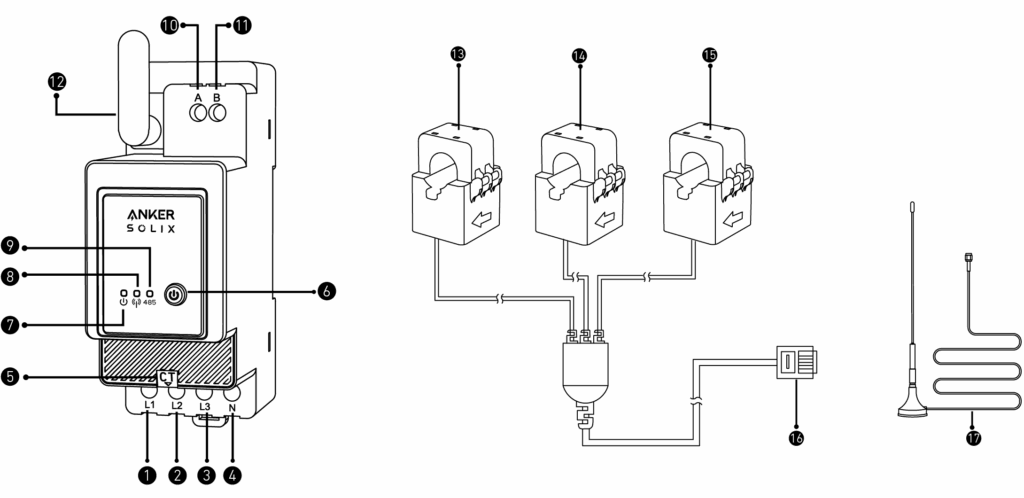
Ankers Smart Meter has 4 cable-connections:
- Phase 1 (brown)
- Phase 2 (black)
- Phase 3 (grey)
These are used to measure the voltage of each phase. We know that electric power ist defined by voltage times current (P = U x I) or Watts = Volt x Ampere. Therefore the current must be measured as well. Therefore on connector ⑤ a current transformer (CT) connector is added (right hand side illustration).
For proper calculation, the current transformers (CTs) must be on the correct phases, as otherwise calculation is incorrect.
Sometimes electricians connect CTs on the wrong phase, causing mentioned Error 35. The article referenced above provides a way to resolve incorrect installed CTs, by pushing 0 Watt (variable A) and 800 Watt (variable B power-values and calculating B – A, having one CT installed at a time. If the Smartmeter displays approx. -800 Watt, the connector is at the right place. Keep in mind to switch-off any 3rd party electricity consumer and provider during the test; as they move values from -800 to others. You need your router, network and Anker Solix active for making configuration changes, which already change electricity values. Keep that deviation at a minimum.
